Quickstart
Installation
From PyPi:
Prerequisites:
git 2.27 or later
To install fastapi-mvc from PyPi use pip install command:
pip install fastapi-mvc
To verify that you have everything installed correctly, you should be able to run the following in a new terminal:
fastapi-mvc --help
From source with Poetry:
Prerequisites:
Python 3.8 or later (How to install python)
make
git 2.27 or later
(optional) curl
(optional) Poetry (How to install poetry)
To install fastapi-mvc from source first clone the repository and use make install target:
git clone https://github.com/fastapi-mvc/fastapi-mvc.git
cd fastapi-mvc
make install
By default make install target will search first for python3 then python executable in your PATH.
If needed this can be overridden by PYTHON environment variable.
export PYTHON=/path/to/my/python
make install
Lastly if Poetry is not found in its default installation directory (${HOME}/.local/share/pypoetry) this target will install it for you. However, one can always point to existing/customize Poetry installation with environment variables:
export POETRY_HOME=/custom/poetry/path
export POETRY_CACHE_DIR=/custom/poetry/path/cache
export POETRY_VIRTUALENVS_IN_PROJECT=true
make install
Or using Poetry directly, should you choose:
poetry install
From source with Nix
Prerequisites:
Nix 2.8.x or later installed (How to install Nix)
First enable Nix flakes if needed.
Optionally setup fastapi-mvc Nix binary cache to speed up the build process:
nix-env -iA cachix -f https://cachix.org/api/v1/install
cachix use fastapi-mvc
To build default fastapi-mvc package run:
nix build github:fastapi-mvc/fastapi-mvc#default --profile $HOME/.nix-profile
Or with concrete Python version, should you choose:
# Build with Python38
nix build github:fastapi-mvc/fastapi-mvc#fastapi-mvc-py38 --profile $HOME/.nix-profile
# Build with Python39
nix build github:fastapi-mvc/fastapi-mvc#fastapi-mvc-py39 --profile $HOME/.nix-profile
# Build with Python310
nix build github:fastapi-mvc/fastapi-mvc#fastapi-mvc-py310 --profile $HOME/.nix-profile
Lastly, to spawn shell for development environment for fastapi-mvc run:
nix develop github:fastapi-mvc/fastapi-mvc#default
Creating a new project
Fastapi-mvc comes with a number of scripts called generators that are designed to make your development life easier by creating everything that’s necessary to start working on a particular task. One of these is the new application generator, which will provide you with the foundation of a fresh FastAPI application so that you don’t have to write it yourself.
To use this generator, open a terminal and run:
$ fastapi-mvc new /tmp/galactic-empire
🎤 What's your project name?
Do not use dots or spaces in the name; just "A-Za-z0-9-_" please.
   galactic-empire
🎤 What is the project repository URL?
   https://your.repo.url.here
🎤 What is the project container image name?
   galactic-empire
🎤 What is the project CLI entrypoint name?
   galactic-empire
🎤 What is the project Helm chart name?
   galactic-empire
🎤 Tell me who you are.
   Radosław Szamszur
🎤 Tell me your email.
   radoslawszamszur@gmail.com
🎤 What is the project description?
   This project was generated with fastapi-mvc.
🎤 What is the project initial version?
   0.1.0
🎤 Do you want to include Redis utilities and Kubernetes deployment?
   Yes
🎤 Do you want to include Helm chart for the project?
   Yes
🎤 Do you want to include GitHub actions?
   Yes
🎤 Do you want to include Nix expression files?
   Yes
🎤 Do you want to include aiohttp utility?
   Yes
🎤 What is your project license?
   MIT
🎤 What is your project copyright date?
   2022

Copying from template version 0.1.0
    create  .
    create  galactic_empire
    create  galactic_empire/wsgi.py
    create  galactic_empire/version.py
    create  galactic_empire/config
    create  galactic_empire/config/redis.py
    create  galactic_empire/config/gunicorn.py
    create  galactic_empire/config/application.py
    create  galactic_empire/config/__init__.py
    create  galactic_empire/cli
    create  galactic_empire/cli/utils.py
    create  galactic_empire/cli/serve.py
    create  galactic_empire/cli/cli.py
    create  galactic_empire/cli/__init__.py
    create  galactic_empire/app
    create  galactic_empire/app/views
    create  galactic_empire/app/views/ready.py
    create  galactic_empire/app/views/error.py
    create  galactic_empire/app/views/__init__.py
    create  galactic_empire/app/utils
    create  galactic_empire/app/utils/redis.py
    create  galactic_empire/app/utils/aiohttp_client.py
    create  galactic_empire/app/utils/__init__.py
    create  galactic_empire/app/router.py
    create  galactic_empire/app/models
    create  galactic_empire/app/models/__init__.py
    create  galactic_empire/app/exceptions
    create  galactic_empire/app/exceptions/http.py
    create  galactic_empire/app/exceptions/__init__.py
    create  galactic_empire/app/controllers
    create  galactic_empire/app/controllers/ready.py
    create  galactic_empire/app/controllers/__init__.py
    create  galactic_empire/app/asgi.py
    create  galactic_empire/app/__init__.py
    create  galactic_empire/__main__.py
    create  galactic_empire/__init__.py
    create  .fastapi-mvc.yml
    create  manifests
    create  manifests/persistent-storage-no-pvc-deletion.yaml
    create  manifests/all-redis-operator-resources.yaml
    create  shell.nix
    create  overlay.nix
    create  image.nix
    create  editable.nix
    create  Nix.mk
    create  charts
    create  charts/galactic-empire
    create  charts/galactic-empire/values.yaml
    create  charts/galactic-empire/templates
    create  charts/galactic-empire/templates/tests
    create  charts/galactic-empire/templates/tests/test-connection.yaml
    create  charts/galactic-empire/templates/serviceaccount.yaml
    create  charts/galactic-empire/templates/service.yaml
    create  charts/galactic-empire/templates/ingress.yaml
    create  charts/galactic-empire/templates/hpa.yaml
    create  charts/galactic-empire/templates/deployment.yaml
    create  charts/galactic-empire/templates/configmap.yml
    create  charts/galactic-empire/templates/_helpers.tpl
    create  charts/galactic-empire/templates/NOTES.txt
    create  charts/galactic-empire/README.md
    create  charts/galactic-empire/Chart.yaml
    create  charts/galactic-empire/.helmignore
    create  .github
    create  .github/workflows
    create  .github/workflows/nix.yml
    create  .github/workflows/integration.yml
    create  .github/workflows/main.yml
    create  .github/workflows/docs.yml
    create  .github/dependabot.yml
    create  tests
    create  tests/unit
    create  tests/unit/test_wsgi.py
    create  tests/unit/cli
    create  tests/unit/cli/test_utils.py
    create  tests/unit/cli/test_serve.py
    create  tests/unit/cli/test_cli.py
    create  tests/unit/cli/conftest.py
    create  tests/unit/cli/__init__.py
    create  tests/unit/app
    create  tests/unit/app/views
    create  tests/unit/app/views/test_ready.py
    create  tests/unit/app/views/test_error.py
    create  tests/unit/app/views/__init__.py
    create  tests/unit/app/utils
    create  tests/unit/app/utils/test_redis.py
    create  tests/unit/app/utils/test_aiohttp_client.py
    create  tests/unit/app/utils/__init__.py
    create  tests/unit/app/test_asgi.py
    create  tests/unit/app/models
    create  tests/unit/app/models/__init__.py
    create  tests/unit/app/exceptions
    create  tests/unit/app/exceptions/test_http.py
    create  tests/unit/app/exceptions/__init__.py
    create  tests/unit/app/controllers
    create  tests/unit/app/controllers/test_ready.py
    create  tests/unit/app/controllers/__init__.py
    create  tests/unit/app/conftest.py
    create  tests/unit/app/__init__.py
    create  tests/unit/__init__.py
    create  tests/integration
    create  tests/integration/test_ready_endpoint.py
    create  tests/integration/__init__.py
    create  tests/__init__.py
    create  pyproject.toml
    create  docs
    create  docs/nix.rst
    create  docs/usage.rst
    create  docs/license.rst
    create  docs/install.rst
    create  docs/index.rst
    create  docs/deployment.rst
    create  docs/conf.py
    create  docs/api.rst
    create  docs/_static
    create  docs/_static/logo.png
    create  default.nix
    create  build
    create  build/dev-env.sh
    create  build/install.sh
    create  build/image.sh
    create  Vagrantfile
    create  TAG
    create  README.md
    create  Poetry.mk
    create  Makefile
    create  LICENSE
    create  Dockerfile
    create  CHANGELOG.md
    create  .gitignore
    create  .dockerignore
    create  .coveragerc

 > Running task 1 of 1: ln -srf CHANGELOG.md docs/CHANGELOG.md

       run  make install
[install] Begin installing project.
Creating virtualenv galactic-empire in /tmp/galactic-empire/.venv
Updating dependencies
Resolving dependencies... (0.7s)

Writing lock file

Package operations: 75 installs, 0 updates, 0 removals

  • Installing certifi (2022.9.24)
  • Installing charset-normalizer (2.1.1)
  • Installing frozenlist (1.3.1)
  • Installing idna (3.4)
  • Installing markupsafe (2.1.1)
  • Installing mdurl (0.1.2)
  • Installing multidict (6.0.2)
  • Installing pyparsing (3.0.9)
  • Installing pytz (2022.4)
  • Installing sniffio (1.3.0)
  • Installing urllib3 (1.26.12)
  • Installing zipp (3.9.0)
  • Installing aiosignal (1.2.0)
  • Installing alabaster (0.7.12)
  • Installing anyio (3.6.1)
  • Installing async-timeout (4.0.2)
  • Installing attrs (22.1.0)
  • Installing babel (2.10.3)
  • Installing docutils (0.19)
  • Installing imagesize (1.4.1)
  • Installing importlib-metadata (5.0.0)
  • Installing iniconfig (1.1.1)
  • Installing jinja2 (3.1.2)
  • Installing markdown-it-py (2.1.0)
  • Installing mccabe (0.7.0)
  • Installing packaging (21.3)
  • Installing pluggy (1.0.0)
  • Installing py (1.11.0)
  • Installing pycodestyle (2.9.1)
  • Installing pyflakes (2.5.0)
  • Installing pygments (2.13.0)
  • Installing requests (2.28.1)
  • Installing snowballstemmer (2.2.0)
  • Installing sphinxcontrib-applehelp (1.0.2)
  • Installing sphinxcontrib-devhelp (1.0.2)
  • Installing sphinxcontrib-jsmath (1.0.1)
  • Installing sphinxcontrib-htmlhelp (2.0.0)
  • Installing sphinxcontrib-serializinghtml (1.1.5)
  • Installing sphinxcontrib-qthelp (1.0.3)
  • Installing tomli (2.0.1)
  • Installing typing-extensions (4.4.0)
  • Installing yarl (1.8.1)
  • Installing aiohttp (3.8.3)
  • Installing click (8.1.3)
  • Installing coverage (6.5.0)
  • Installing flake8 (5.0.4)
  • Installing h11 (0.14.0)
  • Installing httptools (0.5.0)
  • Installing mdit-py-plugins (0.3.1)
  • Installing mypy-extensions (0.4.3)
  • Installing pathspec (0.10.1)
  • Installing platformdirs (2.5.2)
  • Installing pydantic (1.10.2)
  • Installing pydocstyle (6.1.1)
  • Installing pytest (7.1.3)
  • Installing python-dotenv (0.21.0)
  • Installing pyyaml (6.0)
  • Installing sphinx (5.2.3)
  • Installing starlette (0.20.4)
  • Installing uvloop (0.17.0)
  • Installing watchfiles (0.17.0)
  • Installing websockets (10.3)
  • Installing aioredis (2.0.1)
  • Installing aioresponses (0.7.3)
  • Installing black (22.8.0)
  • Installing fastapi (0.85.0)
  • Installing flake8-docstrings (1.6.0)
  • Installing flake8-import-order (0.18.1)
  • Installing flake8-todo (0.7)
  • Installing gunicorn (20.1.0)
  • Installing myst-parser (0.18.1)
  • Installing pallets-sphinx-themes (2.0.2)
  • Installing pytest-asyncio (0.19.0)
  • Installing pytest-cov (4.0.0)
  • Installing uvicorn (0.18.3)

Installing the current project: galactic-empire (0.1.0)
Project successfully installed.
To activate virtualenv run: $ poetry shell
Now you should access CLI script: $ galactic-empire --help
Alternatively you can access CLI script via poetry run: $ poetry run galactic-empire --help
To deactivate virtualenv simply type: $ deactivate
To activate shell completion:
 - for bash: $ echo 'eval "$(_GALACTIC_EMPIRE_COMPLETE=source_bash galactic-empire)' >> ~/.bashrc
 - for zsh: $ echo 'eval "$(_GALACTIC_EMPIRE_COMPLETE=source_zsh galactic-empire)' >> ~/.zshrc
 - for fish: $ echo 'eval "$(_GALACTIC_EMPIRE_COMPLETE=source_fish galactic-empire)' >> ~/.config/fish/completions/galactic-empire.fish
This will create a fastapi-mvc project called galactic-empire in a /tmp/galactic-empire directory and install its dependencies using make install.
After you create the application, switch to its folder:
$ cd /tmp/galactic-empire
The galactic-empire directory will have a number of generated files and folders that make up the structure of a fastapi-mvc application. Here’s a basic rundown on the function of each of the files and folders that fastapi-mvc creates by default:
├── .github
│   └── workflows                GitHub Actions definition
├── build                        Makefile scripts
├── charts                       Helm chart for application
│   └── galactic-empire
├── galactic_empire              Python project root
│   ├── app                      FastAPI core implementation
│   │   ├── controllers          Application controllers
│   │   ├── exceptions           Application custom exceptions
│   │   ├── models               Application models
│   │   ├── utils                Application utilities
│   │   ├── router.py            Application root APIRouter
│   │   └── asgi.py              Application ASGI node implementation
│   ├── cli                      Application CLI implementation
│   ├── config                   Configuration submodule
│   │   ├── application.py       Application configuration
│   │   ├── gunicorn.py          Gunicorn configuration
│   │   └── redis.py             Redis configuration
│   ├── version.py               Application version
│   └── wsgi.py                  Application WSGI master node implementation
├── manifests                    Manifests for spotathome/redis-operator
├── tests
│   ├── integration              Integration test implementation
│   ├── unit                     Unit tests implementation
├── CHANGELOG.md
├── Dockerfile                   Dockerfile definition
├── .dockerignore
├── .coveragerc
├── .gitignore
├── fastapi-mvc.ini              Fastapi-mvc application configuration.
├── shell.nix                    Development environment Nix expression file.
├── overlay.nix                  Set of Nix overlays to extend and change nixpkgs.
├── default.nix                  Python project Nix expression file.
├── editable.nix                 Editable Python project Nix expression file.
├── image.nix                    Container image Nix expression file.
├── LICENSE
├── Makefile                     Makefile definition
├── Poetry.mk                    Sub Makefile containing targets for Poetry
├── Nix.mk                       Sub Makefile containing targets for Nix
├── poetry.lock                  Poetry dependency management lock file
├── pyproject.toml               PEP 518 - The build system dependencies
├── README.md
├── TAG                          Application version for build systems
└── Vagrantfile                  Virtualized environment definition
Overriding default template
If needed one can always override default fastapi-mvc new project template. For that use case fastapi-mvc new command comes with the following CLI options:
--use-version- The branch, tag or commit ID to checkout--use-repo- Overrides fastapi-mvc copier-project repository.
Examples:
# Use default template from specific version (tag)
fastapi-mvc new --use-version 0.1.0 /tmp/galactic-empire
# Use default template from specific commit
fastapi-mvc new --use-version 519ce9f23dbef378bf958d2463171930feab6dc2 /tmp/galactic-empire

# Completely overrides template remote
fastapi-mvc new --use-repo https://github.com/johndoe/my-copier-project.git /tmp/galactic-empire
Hello, World!
To begin with, let’s get some text up on screen quickly. To do this, you need to get your uvicorn development server running.
Starting up the Web Server
You actually have a functional FastAPI application already. To see it, you need to start a web server on your development machine. You can do this by running the following command in the galactic-empire directory:
$ fastapi-mvc run
INFO:     Will watch for changes in these directories: ['/tmp/galactic-empire']
INFO:     Uvicorn running on http://127.0.0.1:8000 (Press CTRL+C to quit)
INFO:     Started reloader process [4039270] using WatchFiles
INFO:     Started server process [4039305]
INFO:     Waiting for application startup.
INFO:     Application startup complete.
This will start up uvicron development server (ASGI) distributed with fastapi-mvc by default. To see your application in action, open a browser window and navigate to http://127.0.0.1:8000. You should see the FastAPI interactive API documentation page:
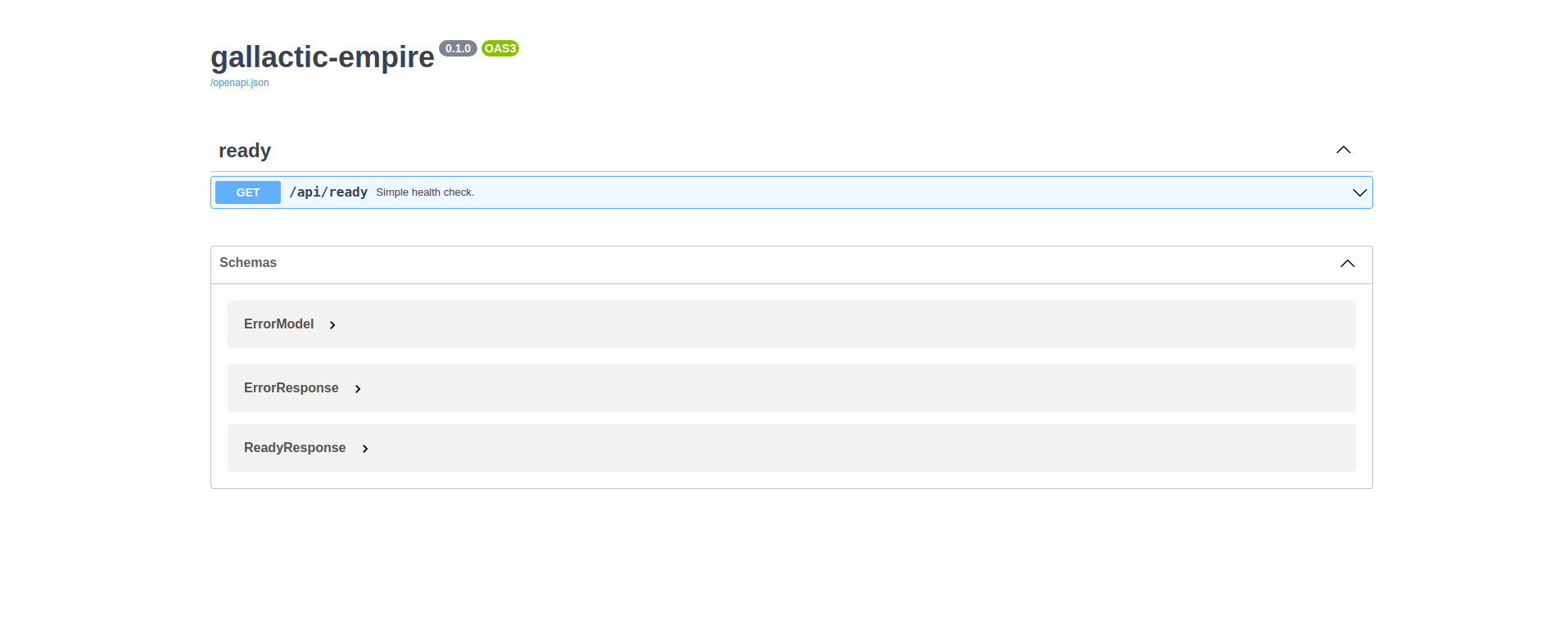
When you want to stop the web server, hit Ctrl+C in the terminal window where it’s running. When using uvicorn development server, you don’t need to restart the it; changes you make in files will be automatically picked up by the uvicorn.
The FastAPI documentation page is the smoke test for a new fastapi-mvc application: it makes sure that you have your software configured correctly enough to serve a page.
You can also check application health by running GET request to /api/ready endpoint:
$ curl 127.0.0.1:8000/api/ready
{"status":"ok"}
Lastly, you can always use the project serve CLI command for starting production unicorn + uvicorn (WSGI + ASGI) server:
$ galactic-empire serve
[2022-04-23 20:21:49 +0000] [4769] [INFO] Start gunicorn WSGI with ASGI workers.
[2022-04-23 20:21:49 +0000] [4769] [INFO] Starting gunicorn 20.1.0
[2022-04-23 20:21:49 +0000] [4769] [INFO] Listening at: http://127.0.0.1:8000 (4769)
[2022-04-23 20:21:49 +0000] [4769] [INFO] Using worker: uvicorn.workers.UvicornWorker
[2022-04-23 20:21:49 +0000] [4769] [INFO] Server is ready. Spawning workers
[2022-04-23 20:21:49 +0000] [4771] [INFO] Booting worker with pid: 4771
[2022-04-23 20:21:49 +0000] [4771] [INFO] Worker spawned (pid: 4771)
[2022-04-23 20:21:49 +0000] [4771] [INFO] Started server process [4771]
[2022-04-23 20:21:49 +0000] [4771] [INFO] Waiting for application startup.
[2022-04-23 20:21:49 +0000] [4771] [INFO] Application startup complete.
[2022-04-23 20:21:49 +0000] [4772] [INFO] Booting worker with pid: 4772
[2022-04-23 20:21:49 +0000] [4772] [INFO] Worker spawned (pid: 4772)
[2022-04-23 20:21:49 +0000] [4772] [INFO] Started server process [4772]
[2022-04-23 20:21:49 +0000] [4772] [INFO] Waiting for application startup.
[2022-04-23 20:21:49 +0000] [4772] [INFO] Application startup complete.
Creating new endpoint
To create new endpoint, you need to create at minimum a route and controller with a method.
Lets say we want to create death_star controller with following endpoints:
status (GET)
load (POST)
fire (DELETE)
For that we will run the controller generator:
$ fastapi-mvc generate controller death_star status load:post fire:delete
This will do several things for you:
Create controller: galactic_empire/app/controllers/death_star.py
Create unit test: tests/unit/app/controllers/test_death_star.py
Add router entry in: galactic_empire/config/router.py
The most important of these is the controller file, galactic_empire/app/controllers/death_star.py.
Let’s take a look at it:
"""Death star controller implementation."""
import logging

from fastapi import APIRouter


router = APIRouter(
    prefix="/death_star"
)
log = logging.getLogger(__name__)


@router.get(
    "/status",
    status_code=200,
    # Decorator options:
    # https://fastapi.tiangolo.com/tutorial/path-operation-configuration/
)
async def status():
    # Implement endpoint logic here.
    return {"hello": "world"}


@router.post(
    "/load",
    status_code=200,
    # Decorator options:
    # https://fastapi.tiangolo.com/tutorial/path-operation-configuration/
)
async def load():
    # Implement endpoint logic here.
    return {"hello": "world"}


@router.delete(
    "/fire",
    status_code=200,
    # Decorator options:
    # https://fastapi.tiangolo.com/tutorial/path-operation-configuration/
)
async def fire():
    # Implement endpoint logic here.
    return {"hello": "world"}
Endpoints are just methods with FastAPI path decorator aggregated in one file that makes a controller.
For more information please refer to FastAPI documentation, some useful links:
Now let’s look at router configuration:
"""Application routes configuration.

In this file all application endpoints are being defined.
"""
from fastapi import APIRouter
from galactic_empire.app.controllers import death_star
from galactic_empire.app.controllers.api.v1 import ready

router = APIRouter(prefix="/api")

router.include_router(ready.router, tags=["ready"])
router.include_router(death_star.router)
As you can see controller generator automatically added FastAPI router entries for you.
You can always disable this behaviour by running with the --skip-routes option.
Lastly let’s try if our new endpoints actually work:
$ curl 127.0.0.1:8000/api/death_star/status
{"hello":"world"}
$ curl -X POST 127.0.0.1:8000/api/death_star/load
{"hello":"world"}
$ curl -X DELETE 127.0.0.1:8000/api/death_star/fire
{"hello":"world"}
Project documentation
As you can see fastapi-mvc is just a tool designed to make your FastAPI development life easier, by creating everything that’s necessary to start working on a particular task. However, generated project by fastapi-mvc is fully independent and does not require it in order to work. You can learn more about it from included documentation in it.
If you did not skip GitHub Actions during project generation, the documentation will be deployed to your project GitHub pages via Build Docs workflow.
Note
You might need to enable GitHub pages for this project first.
To build docs manually:
make docs
Then open ./site/index.html with any browser.
Lastly, you can always have a look at the fastapi-mvc/example documentation deployment.
Updating project
Prerequisites:
Project is git tracked
Project is not git dirty
Generated projects by fastapi-mvc can be easily updated with changes from the given copier-project template version.
For that we will run fastapi-mvc update command:
fastapi-mvc update
# Or using alias short-cut
fm u

# Update to concrete version
fastapi-mvc update --use-version 0.3.0
The update feature also allows extending projects with previously not selected features or even changing namespaces. To do so just update answers to project questions. More information on how the update process works can be found here.